


Now that you have fought off the nasty crowds at the electronics store, and secured your Nintendo Wii system, got it home without incident and into your house, this is what you should do. Follow these steps to set up your Wii:
1) Remove the Wii from the box
2) Remove the AV cable and the AC adapter
3) Remove the stand plate, vertical stand, sensor bar and sensor-bar stand
4) Remove the Nunchuk and Wii Remote
5) Choose your location near the TV for your Wii and set it up vertically or horizontally
6) Connect the AV cable and the AC adapter to the Wii
7) Plug the AC adapter into a power outlet. Connect the AV cable to the input on your TV. Connect the yellow cable to the video input and the red and white cables to the audio inputs
8) Get out the remote control and put in the batteries
9) Turn on your Wii
10) The onscreen instructions will appear and you will be required to choose your language, location, time of day, etc.
How to set up your Wii Control
The Wii Remotes do not automatically bond with you Wii console. You will have to tell it to do so. The remote controls and arrives with your console is prebonded, but any additional Wii Remotes you purchase will have to be synchronized with your Wii in order to work smoothly with your console. There are two ways to accomplish this: the Standard Mode and the One Time Mode.
Standard Mode
To use the Standard Mode for connecting additional Wii Remotes to your Wii system permanently follows these steps:
1) Press the power button on your Wii console to turn it on
2) Remove the cover for the batteries on the back of the Wii Remote
3) Press the Sync button inside the cover
4) Open the door located over the SD card slot and on the Wii console
5) Press the Sync button inside that compartment
6) When the LEDs on the remote stop blinking, your synchronization is complete
One Time Mode
The One Time Mode does just that and allows your Wii Remote to work with a Wii other than the current synchronized remote. This is handy when you are at a friend's house. Follow these steps:
1) Press the Home button on the Wii Remote that is already synchronized with the Wii Remote that you intend to use
2) Select the Wii Remote Settings option
3) Select the Reconnect Option
4) Simultaneously press 1 and 2 buttons on the remote that you want to sync to the Wii console
5) When the lights stop blinking and your remote vibrates your remote has temporarily synchronized with that particular Wii console
6) The attachment of the remote should be shown on the screen as well
Article Source: ArticleSpot.org
Sunday, November 4, 2007
How To Set Up Your Wii

Nintendo Wii Brings The Gym To You With Wii Fit
Nintendo has announced a new fitness game Wii Fit which is a full on exercise product set to give you more of a workout than Wii Sports, while still retaining all the fun of gaming. Wii Fit will help to keep you physically fit via a dedicated peripheral, a wireless balance board which comes with the game. There are over 40 different activities, including hula hooping, ski jumping and heading soccer balls.
The hula hooping consists of, as you'd expect, gyrating your hips with a virtual hoop onscreen and then as the game progresses, characters will throw more hoops for you to catch and rotate as many times as you can until the time runs out.
The skiing game gives you two chances to make the longest jump you can whilst keeping your balance when landing. Players can increase speed by leaning forward, the more you lean the faster you'll go, and upon reaching the jump, you stand up straight ensuring your weight is evenly balanced for a good landing.
For the football game, you will need to balance on the board moving from side to side whilst balls are fired at you to hit back on to the field and avoiding other objects that are thrown at you at the same time.
Training falls into 4 categories: Aerobics, muscle conditioning, yoga and balance games. Players can assign their height to a profile to measure body mass index and Wii fitness age as well as monitor progress and record performance statistics.
The calorie busting fun could appeal to couch potato kids as well a non gamers, perhaps using the Nintendo Wii as a slimming tool which would be a move into the lifestyle category rather than gaming, covering the market from another angle.
Nintendo hasn't given a release date yet for Wii Fit, although its thought to hit the highstreet in early 2008.
Article Source: ArticleSpot.org
Wednesday, October 17, 2007
Playstation 3 vs Nintendo Wii vs Xbox 360
Looking to buy a new Nintendo Wii, Microsoft Xbox 360 or Sony Playstation 3?
I have skipped some of the details that all the share. Such as a good online service, state of the art graphics and so forth. These details were what I thought was key differences between the system.
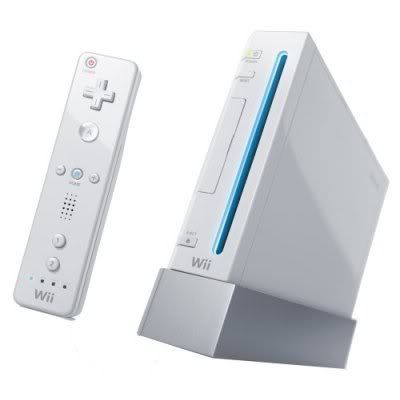
Pros:
- You get exercise while you play!
- Innovative controls make for a new gameplay experience.
- Excellent party games!
- Cartoony family oriented games galore!
- Nintendo only "must have games" like Mario and Zelda.
Cons:
- Hardcore gamers might find the games lacking in depth.
- Too much exercise in games might be difficult for long term gaming sessions.
- Danger of whacking your buddy unconscious and paying for hospital bills.
- Games might be too family oriented for mature gamers.
Nintendo Wii Conclusion: Great machine, everyone should own one. But buy it for the exercise or if you only play with friends when they visit. Not as your only hardcore game machine.
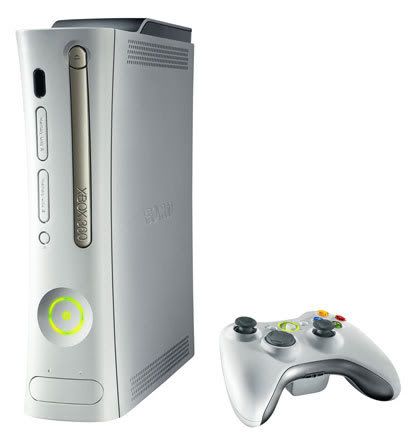
Microsoft Xbox 360
Pros:
- A large selection of excellent games.
- HD DvD Player (optional)
- Xbox only "must have games" like Halo 3 and Gears of War.
- Dark & gritty games galore
Cons:
- Age old console with very few innovations over previous years.
- Can die at any time. Aka "Red ring of death" (New Xbox 360's might not have the red ring of death issue)
- Won't get your mind and body in shape like the Wii.
Microsoft Xbox 360 Conclusion: A great all around gaming machine and my own favorite. I use my 360 more than my Wii. But both are unique and are must haves in their own way.
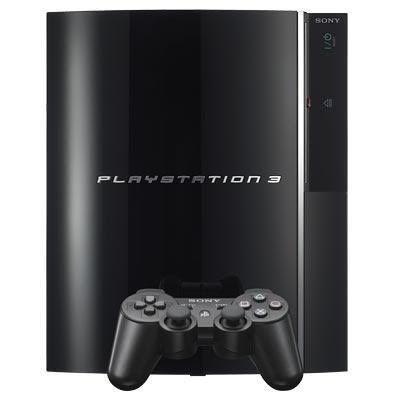
Playstation 3
Pros:
- Has a BluRay DVD player. And the price for a PS3 is about the same as a BluRay player.
- Has some really smoking graphics power.
- Has a new SIXAXIS Contoller system which enables gives more interaction. (Wii still wins for cool controls though)
- Great multimedia capabilities.
- PS3 only "must have games" like Heavenly Sword and Killzone 2
Cons:
- Cost is higher than the other systems by quite a bit. Can get a base Xbox 360 and Wii for about same price as a PS3. (But a good deal if you need a BluRay player. Seems BluRay is pulling ahead of HD DVD from what I have seen)
- Hardly any games out right now.
- See #2 (Hard to justify the price tag until some good games to play are released)
Sony Playstation 3 Conclusion: A great machine to buy if you want a BluRay player. Otherwise I would buy a Wii or 360 until more games are released.
I know I have missed several benefits of each and hope that you might help out by posting your own thoughts below. Please keep all comments constructive and refrain from flaming myself and others.
Thank you.
Is it safe to mod my Wii or Xbox?
The short answer: no
When it comes to the modding community, the reality is that nothing is 100% safe. But, in all likely hood, most people who purchase a mod chip and install it on their own console will escape the notice of law enforcement agencies.
But with major sting operations occurring recently.
"US Gov't Cracks Down On Pirated Games"
Source: Betanews
"Sony busts down mod-chip retailer with $9 mil. lawsuit"
Source: Engadget
"Raid casualty comes forward to tell his story"
Source: XboxScene
I think the better question would be:
Why should I mod my console?
Let's take a look at the positives and negatives to each:
Why mods are good:
- You can play copies or backups of games.
- You can install software and other utilities that enhance the functions of your console
- Games load faster. (If mod or system permits backup from CD/DVD to hard drive)
- Your friends will think you are the $%$ because this seems "dangerous".
- They are illegal and YOU MIGHT GO TO JAIL!
- It hurts the gaming industry due to the revenue lost from software piracy.
- You won't be able to play on your systems game network like Xbox Live or Wii Online.
- Firmware updates can "brick" your system. Meaning it's "dead, kaput, toast, finished"
- See #1.
I personally use a legal and cheaper alternative to buying every console game!
GAMEFLY
(If you want to give it a shot. Free trial offer on right sidebar. Adblockers need to be off to see it)
While Gamefly is not the fastest service in the world, they have been overall pretty good. I have been using them for several months and even purchased some of the games I really enjoyed.
There is also the option of just running down to Hollywood, Blockbuster or one of your local video stores and renting.
I hope this gives you a good perspective on what the benefits and pitfalls are. The choice is ultimately up to you. And you most likely will install it fine and play without worries. But if you are like me, you find that chance always seems to pick on you. I'd rather not have one of the negatives happen to me.